Create 2026 When AI speed meets enterprise control

Watch replays now
Unqork Logo White
      • Product OverviewProduct Overview
      • Security & GovernanceSecurity & Governance
      • Marketplace & SolutionsMarketplace & Solutions
      • Product DocumentationProduct Documentation
      • Release NotesRelease Notes
    • Poster
      • Financial ServicesFinancial Services
      • InsuranceInsurance
      • HealthcareHealthcare
      • GovernmentGovernment
    • Poster
      • Customer StoriesCustomer Stories
      • Creator SpotlightCreator Spotlight
    • Poster
      • PodcastPodcast
      • BlogBlog
      • Customer StoriesCustomer Stories
      • Product DocumentationProduct Documentation
      • TrainingTraining
      • Creator CommunityCreator Community
      • Unqork CreateUnqork Create
      • Webinar & EventsWebinar & Events
    • Poster
      • Partner EcosystemPartner Ecosystem
      • Partner SolutionsPartner Solutions
      • Partner LoginPartner Login
      • Become a PartnerBecome a Partner
    • Poster
      • About UnqorkAbout Unqork
      • Unqork CreateUnqork Create
      • CareersCareers
      • NewsroomNewsroom
      • Contact UsContact Us
    • Poster

Create 2026 When AI speed meets enterprise control

Watch replays now
Contact UsBook a demo
Skip to content
Learn / Academy

Unqork Academy

Learn the skills you need to quickly build future-proof applications—without writing a single line of code.

Get Started

Learn the basics of Unqork

Join your peers in one of the world’s fastest-growing application development communities and learn how to build apps
without code the way that works for you.

Start Learning

Find out how to get hands-on with Unqork and learn your way.

Learn More

Creator Workshops

Join an instructor-led workshop covering the basics of the platform.

Learn More

Earn Your Novice Badge

Build your first Unqork application, and earn your Novice Badge.

Learn More

Start your Unqork journey, your way.

Independent Learning

Our self-guided training material allows you the flexibility to learn on your own time. Expand your skills on the Unqork platform through a series of learning paths.
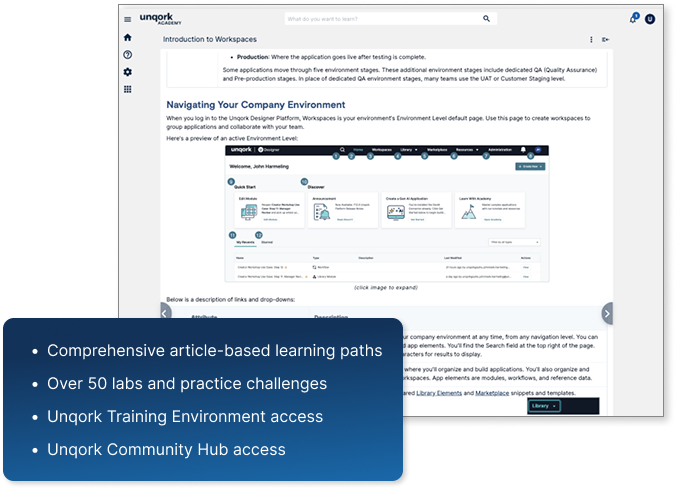
There’s no need to register in advance, making it easy to  balance learning with your day-to-day responsibilities. Master new concepts, reinforce them with comprehensive examples, and complete practice labs and challenges along the way to test your knowledge. 

Team workspaces

Our self-guided training material allows you the flexibility to learn on your own time. Expand your skills on the Unqork platform through a series of learning paths.


Independent Learning
Team workspaces

Frequently Asked Questions

Do I need a technical or coding background to build in Unqork?

To become a Certified Unqork Developer, we recommend you have technical experience. However, Unqork’s intuitive visual-based Ul empowers Creators of all backgrounds to learn and build applications using configurable modules and templates, which means no coding-of any kind—required!

How do I get started?

After registering in Academy, users have the ability to customize their Unqork journey to find the learning style that works for them.

Users can begin an independent learning path, completing articles at their own pace, or attend one of our live instructor-led courses. No matter what your learning style is, you’ll be able to find the perfect fit on Unqork Academy.

How long does it take to become a Certified Unqork Developer?

To become a Certified Unqork Developer, we recommend either completing our Independent learning path or completing our Developer Bootcamp.

Completing the independent learning path can take anywhere from 60-80 hours, while the Developer Bootcamp requires a 40 hour commitment. After you’ve finished the appropriate content, we recommend studying for 2-5 days before registering for the Developer exam.

How can I practice my configuration skills?

We have a replica environment set up for our training program participants to practice configuration, complete capstones and practice work, and study for exams.


To request access, please complete our Training Environment request form. Before completing the form, please ensure to read the requirements listed at the top.

How do I add a badge or certification to my Linkedin page and share it with my network?

Once a badge is issued, you will receive an email with the “Accept the badge” button. Once that is completed, just follow the steps to share it with your social circles.

Additional Resources

  • Blog

Power User Spotlight: Shivangi Pathak, TIAA

  • Blog

Power User Spotlight: Nimesh Pareek, Persistent Systems

  • Partnerships

Power User Spotlight: JPMorgan Chase’s Kriti Shrivastava

View all resources

Discover the Future of

Application Development with Unqork

Take a guided tour and see how Unqork can transform your business with faster, code-free application builds and unparalleled scalability.

Request Demo

AI Speed. Enterprise Control. No Trade-offs.

Book a demo

By Industry

Financial Services

  • Wealth Management
  • Asset Management
  • Private Assets
  • Banking
  • Capital Markets
  • Digital Assets

Insurance

  • Property & Casualty
  • Life & Annuities
  • Group Retirement
  • Group Benefits
  • Reinsurance
  • Government
  • Healthcare

Learn

  • Podcast
  • Blog
  • Training
  • Webinars
  • Trust center
  • Customer Stories

Company

  • About
  • Platform Overview
  • Careers
  • Hiring Process
  • Contact Us

Connect

  • X
  • LinkedIn

Copyright © 2026 Unqork

Do Not Sell or Share My Personal Information
  • Privacy
  • Terms
  • Trust